JCMsuite Interfaces
Set up, script, analyze, and optimize simulation workflows.
JCMsuite combines graphical tools, scripting interfaces, optimization dashboards, and documentation-aware assistance for reproducible photonics simulation work.
Graphical user interfaces
Control projects and inspect results interactively.
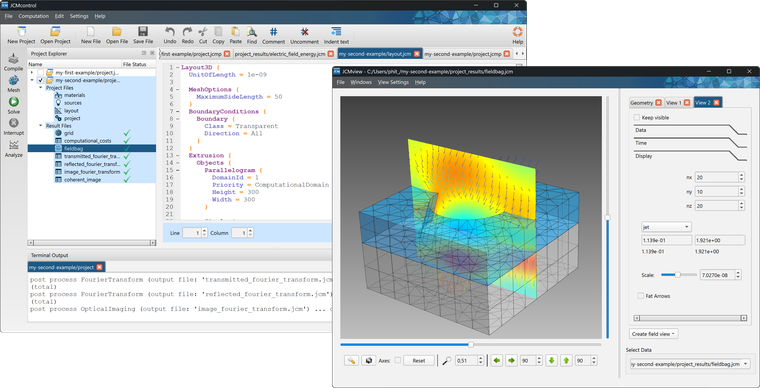
JCMsuite offers graphical user interfaces for controlling, editing, and viewing simulation projects and numerical results.
- JCMcontrol supports project setup with layout descriptions, source definitions, material definitions, numerical settings, and post processes.
- JCMview provides an interactive 3D viewer for meshed layouts and electromagnetic field distributions.
Scripting interfaces
Automate simulations in Python, MATLAB, Octave, or C.
JCMsuite is designed to integrate into Python and MATLAB/Octave environments, with C interfacing available for custom software integrations.
- Build complicated design setups from scripts and reusable templates.
- Run parameter scans and visualize data analysis tasks in familiar scientific computing environments.
- Generate scripts for common analysis workflows directly from JCMcontrol.

Analysis and optimization
Track parameter studies and optimization runs.
Complex analysis and optimization tasks can be set up using high-level Python or MATLAB commands from the JCMoptimizer.
The toolkit integrates an interactive dashboard for visualizing the progress and results of numerical studies.

JCMsuite chatbot
Ask documentation-aware questions while you work.
The JCMsuite chatbot helps users search and apply the documentation for setup syntax, solver options, API usage, tutorials, and troubleshooting questions.
